Home renovation planner: the Costwise Renovation Project Pack
The Costwise Renovation Project Pack is a £29 home renovation planner, and the full version of our free budget spreadsheet. It prices your project from our 158 cost guides, choice by choice and region by region, then runs the job against that plan: record agreed prices and extras, track payments and deliveries, and close the job out at handover. It is paid once and downloads straight away.
What you get
- A Plan sheet that prices your project. Pick from 432 job options across 158 guides, add your sizes, extras and region, and each line shows a low, high and typical price worked out as our calculators do, with the guide it comes from and the month it was reviewed. Each line becomes a row on the Costs sheet, with its typical price as the starting allowance.
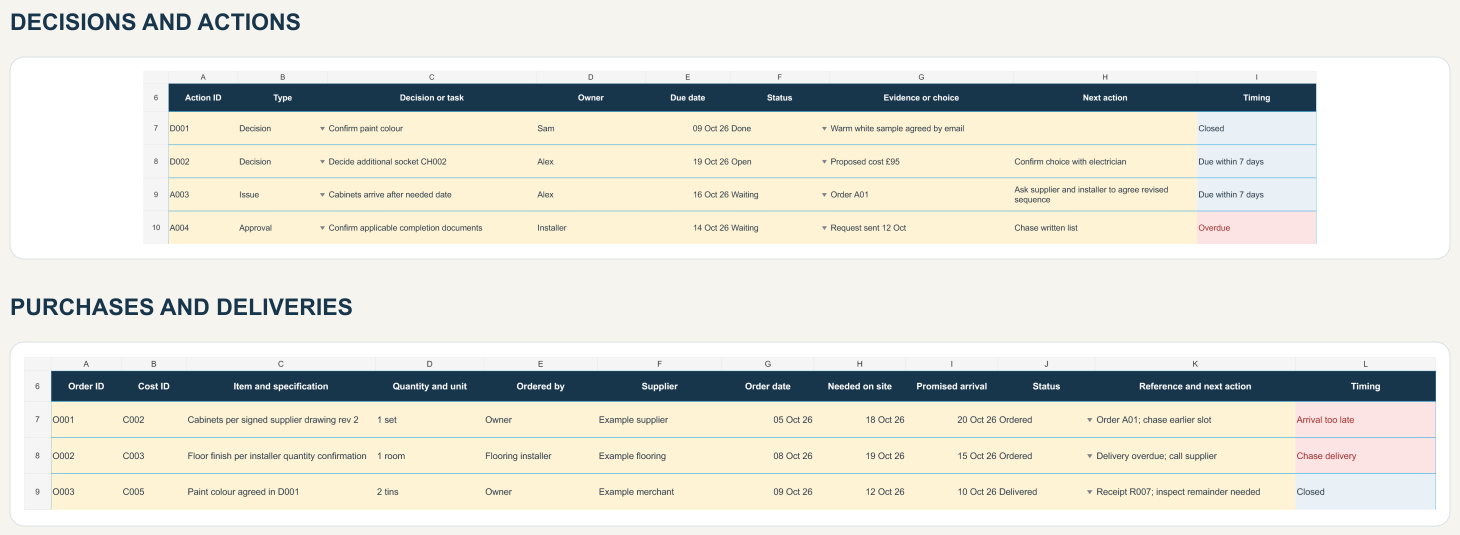
- A project organiser workbook with eight linked sheets beside the Plan: Overview, Costs, Changes, Payments, Orders, Actions, Checklist and Handover. Approved changes and payments attach to the cost they belong to, so the overview shows the forecast, what has been paid and your headroom without counting anything twice. Each log has 100 rows.
- A worked example: a fictional utility-room refresh, planned and then part-way through, with an approved extra, a credit, a part-paid stage and two late deliveries, so you can see how the records fit together before you enter your own.
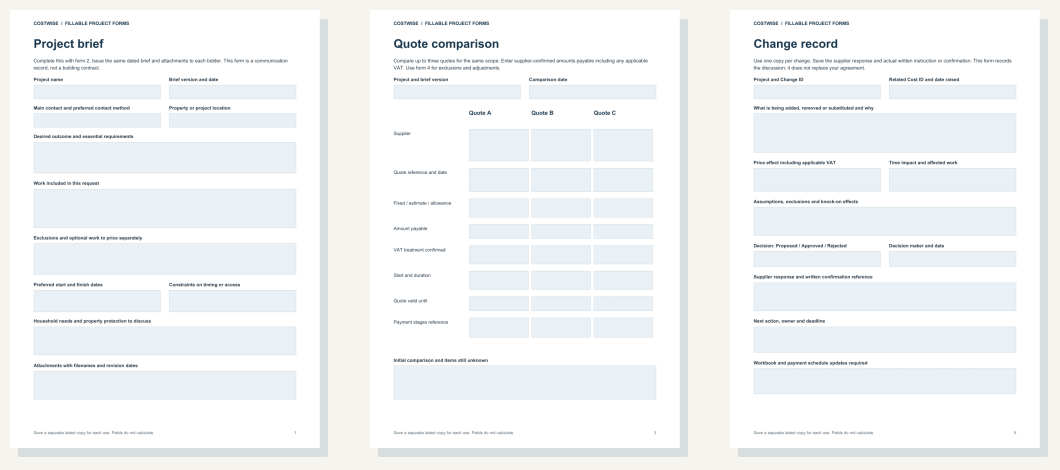
- Seven fillable PDF forms with 88 fields: project brief, specification, quote comparison, quote clarifications, change record, weekly review and handover.
- A two-page guide to pricing your plan, and a 12-page written guide to setting up, comparing quotes fairly, counting each cost once, recording changes, payments and deliveries, running a weekly review and handing over, with a page on common mistakes.
- Six email templates for asking for a comparable quote, clarifying one, pricing a change, chasing a late delivery, confirming a weekly review and following up handover.
A look inside
Three lines from the worked example's Plan sheet, priced from our guides at UK average prices. The rest of its plan is the example's own figures.
| Line | Job and option | Size or count | Low | High | Typical |
|---|---|---|---|---|---|
| C003 | LVT flooring (per m²) | 6 | £175 | £425 | £300 |
| C004 | Electrician: Local electrician, standard hours (per hour) | 10 | £400 | £550 | £475 |
| C006 | Skip hire: Midi skip (4 to 5 cubic yards) (per skip, per week) | 1 | £100 | £200 | £150 |
The money summary from the worked example in the pack, at a weekly review: a fictional utility-room refresh with a £7,500 budget that includes a £750 reserve. The figures illustrate the method, not market prices.
| Money at this review | Amount |
|---|---|
| Latest forecast | £6,410 |
| Paid to date | £3,050 |
| Forecast less paid | £3,360 |
| Budget headroom | £1,090 |
| Working budget excluding reserve | £6,750 |
| Headroom before using reserve | £340 |
| Unpaid scheduled payments | £3,360 |
| Proposed changes not in forecast | £95 |
The full version of the free spreadsheet
Our free budget spreadsheet gives one line per job with our guide prices and an area factor. This pack prices each part of your project the way our online calculators do, with your own sizes, options, extras and region, and then keeps going once the quotes arrive: who agreed what, what has been paid and what is still outstanding. The free builder contract template and snagging checklist work alongside it, and the pack's guide points to both. All three stay free.
How to keep a renovation on budget once work starts
This is the method the pack is built around. You can follow it on paper or in any spreadsheet; the pack sets it up for you.
- Give every trade the same written brief. Quotes only compare when they price the same work, so write down the scope and specification first and send the same document to each. Our quote comparison tool shows what to check in what comes back.
- Set a working budget and hold a reserve. Most builders suggest keeping 10 to 15 per cent back for what the walls hide. Spend from the working budget and treat the reserve as untouched until something goes wrong.
- Agree every change in writing, with its price, before the work is done. Record it against the cost it changes, so an extra is counted once and a credit comes off the right line.
- Pay in stages against work completed. Never pay a large deposit up front. Record each payment against the cost it belongs to, and the difference between your forecast and what you have paid is what you still owe.
- Review the job once a week. Look at the forecast, the payments due, the deliveries due and the actions overdue, so a late delivery or an unpriced extra shows up while it can still be dealt with.
- Hand over against a snagging list. Walk the finished job with a snagging list and hold back the final payment until it is clear.
Before you buy
- It is an organising tool, not a building contract, technical design or professional advice, and it cannot guarantee savings, dates or the quality of the work.
- The Plan's prices are Costwise guide prices as at the month each line shows. They are guide prices, not quotes, and they do not update themselves: check the guide page a line names before you rely on it.
- The workbooks are ordinary .xlsx files with no macros or links to outside data. We have tested them in Google Sheets and Excel; if you use anything else, try a copy first. In Google Sheets, open the file from Google Drive and choose File > Save as Google Sheets, then work in that copy. Edit them on a computer; a phone is fine for reading the guide.
- The forms need a PDF reader that can fill and save forms, and the quote comparison does not add up totals for you. Reopen a saved copy to check your answers stayed.
- Help with using the files is by email to [email protected].
Paying, cancelling and faults
The price is £29 in total, including any VAT, paid once through Whop, which processes the payment. There is no subscription, and the files are yours to download as soon as the payment goes through.
You can cancel within 14 days of buying for a full refund, even if you have already downloaded the files. Email [email protected] with the email address you bought with and the date you bought. You do not need to give a reason, and the refund goes back to the way you paid within 14 days of your email.
If a file is faulty or not as described, the Consumer Rights Act 2015 entitles you to have it repaired or replaced and, if that cannot be done or is not done within a reasonable time, to a price reduction, which can be the full price. Email [email protected].
Sold by Stephen Evans, trading as Costwise. The full terms of sale, with the seller's postal address and a cancellation form, are linked at checkout before you pay, and a copy comes in the ZIP. Contact [email protected].
Does buying it change anything on this site?
No. The pack is one of the ways we earn, listed on our disclosure page with the others. It has no effect on the prices, guides or calculators here, and all of them stay free.
Common questions
What is a renovation planner?
A record you keep while the work happens: what you asked each trade to price, what they quoted, which extras you agreed, what you have paid and what is still to come. A budget spreadsheet plans what the work should cost before you start; a planner keeps track of the job once it starts.
Is there a free renovation planner?
Costwise's free budget spreadsheet, for Excel and Google Sheets, gives one line per job with our guide prices filled in, and our builder contract template and snagging checklist are free too. The Renovation Project Pack, at £29, is the full version: it prices each part of the project with your own sizes, options and region, then tracks the job against that plan.
Where do the prices in the planner come from?
From the 158 Costwise cost guides, worked out the way our online calculators work them out, for the four regions the site uses. Each line names its guide and the month its prices were reviewed. They are guide prices, not quotes, and they stay as they were when you downloaded the pack, so check the guide page before you rely on a line.
Does the renovation planner work in Excel and Google Sheets?
The workbooks are ordinary .xlsx files with no macros or links to outside data. We have tested them in Google Sheets and Excel; if you use anything else, try a copy first. Edit them on a computer.
Is the pack a subscription?
No. It costs £29 in total, including any VAT, paid once, and the files download as soon as the payment goes through.
Can I get a refund?
Yes. You can cancel within 14 days of buying for a full refund, even if you have already downloaded the files. Email Costwise with the email address you bought with and the date you bought; you do not need to give a reason.
Is it only for big projects?
No. The worked example in the pack is a £7,500 utility-room refresh, and each log holds 100 rows, so a larger job with more trades fits as well.